Speed AutoClicker – extreme fast Auto Clicker
Speed AutoClicker is an extreme fast auto clicker that can click more than 50000 times per second.

It allows you to set an activation key to switch automatic clicking 시그널 음악. There are two activation modes:
- “hold”: Speed AutoClicker will repeat clicking as long as the activation key is pressed
- “toggle”: First key press will activate automatic clicking until the activation key is pressed again
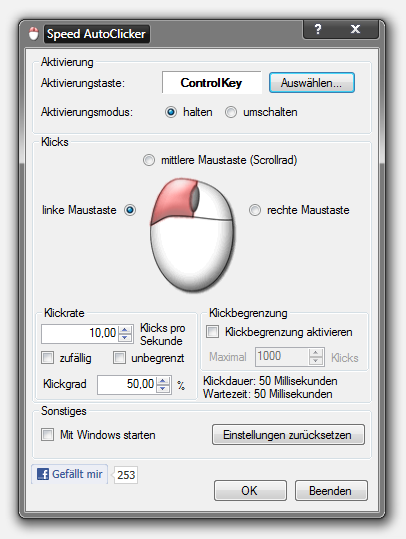
Moreover you can select the clicked mouse button: left, right or middle button (Scroll wheel) can be clicked to extreme, physically impossible, click rates Download visual studio community 2013.
You can adjust the click frequency to fit your needs, but be careful with the “Unlimited” option: Tons of clicks can make applications and games unstable and they can even crash Download Windows Notepad. Click rates below 500 clicks per second should be safe.
You can measure the real click rates with ClickCounter Teen movie.
Speed AutoClicker does not require any setup or installation. Just download and extract it on your desktop. Note that it requires .NET Framework, which is included in Windows 7 usb 3.0 드라이버 다운로드. XP users might have to download it.
New in Version 1.3:
- random click rates (bypasses the auto clicker protection of some games)
- Click duty cycle
- now even faster when click rate is set to unlimited
FAQ
- I get the error message “The application failed to initialize properly (0xc0000135) Download hexdump. Click on OK to terminate the application.”
- Solution: Install .NET Framework 3.5, click here to download, and .NET 4.5
no
The emphasis on adjusting the click interval for extreme speeds is useful, especially for repetitive tasks where manual clicking becomes tiring. For readers taking breaks between sessions, Precio de cada tipo de combustible hoy en España is also a practical resource for checking current fuel prices in Spain before heading out.
im gay
me too
jewish nigger
hi
Die zwei Aktivierungsmodi – halten und umschalten – machen diesen Auto-Klicker so viel flexibler, perfekt für verschiedene Dinge wie Gaming.
Escape from Playtime character guide
I want to win this game
for games
halo extreme auto clicker
lol
what the fuck
i dont know f i should trust this bro
nigga
I’ve been looking for an auto clicker that can hit that extreme 5000 clicks per second mark for some tedious UI testing. Setting custom activation keys makes it way easier to control without messing up other tasks. When I need to upscale the low-res screenshots from my tests, I usually run them through Bigjpg AI Image Enlarger – How the AI Image Enlarger Works, to clean up the detail.
wow
La Peace
still waiting for macro
this shit ass nigga
nonot01101@gmail.com
The toggle and hold activation modes are a thoughtful touch for anyone running repetitive tasks, though I’d be cautious with the unlimited click rate since it can destabilize applications. For those of us who spend long sessions automating workflows, it’s worth pairing efficiency tools with something creative to unwind—Claude Imagine image generation offers a nice break, letting you turn text prompts into visuals or refine existing images through a web interface or directly inside Claude. With models like Flux 2 Pro and Nano Banana 2, it’s a smooth way to recharge between marathon clicking sessions.
*moans*
…
Der Hinweis, dass die meisten Spiele und Anwendungen ohnehin nur 100 bis 500 Klicks pro Sekunde verarbeiten, ist praktisch wichtiger als die theoretische Obergrenze. Ich würde die maximale Klickrate deshalb immer fest setzen, statt die Begrenzung aufzuheben.
The toggle and hold activation modes are a smart touch for anyone juggling repetitive tasks, though I’d be cautious with the unlimited click rate on older machines. For content creators spending hours trimming footage instead, there’s a simpler shortcut: tools that convert long video to short video with AI can automate the tedious parts and free up time for the creative work. Worth testing the free tier before committing to anything heavier.
poopie dih
Die zwei Aktivierungsmodi (halten und umschalten) finde ich richtig praktisch – funktioniert das 50.000 Klicks pro Sekunde wirklich für Browsergames?
browser game controls
Die gemessenen gut 30.000 Klicks pro Sekunde auf einem DualCore klingen erst beeindruckend, bis die Empfehlung kommt, trotzdem ein Limit zu setzen. Dass die meisten Anwendungen nur 100 bis 500 Klicks verarbeiten, macht die einstellbare Obergrenze zum eigentlichen praktischen Detail.